
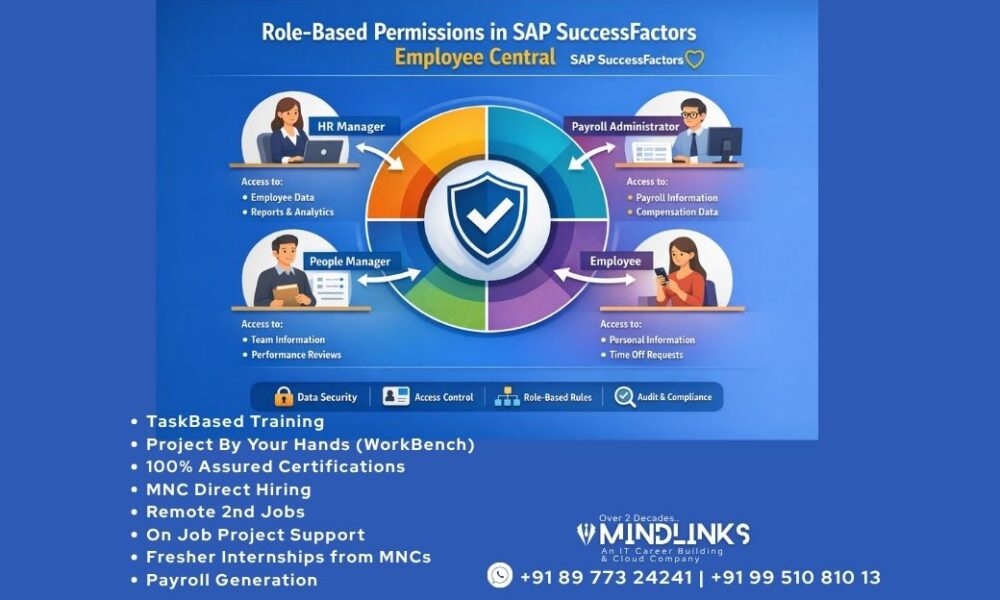
Role-Based Permissions in SAP SuccessFactors Employee Central
For More Job Updates and Placements info join this Whatsapp Channel: https://whatsapp.com/channel/0029Va85cqaBadmfJ9fYTw3c
Role-Based Permissions in SAP SuccessFactors Employee Central are a foundational element for securing HR data and controlling access within modern organizations. In a cloud-based HR system like SAP SuccessFactors Employee Central, managing who can view, edit, and approve employee data is critical for both operational efficiency and compliance. With SAP SuccessFactors Employee Central Permissions, organizations can implement a structured role-based access control SAP SuccessFactors model that ensures only authorized users have access to sensitive information.
To master this concept practically, many professionals choose structured training programs. If you’re looking to build hands-on expertise, you can explore this course:
👉 SAP SuccessFactors Employee Central Online Training
This type of training helps you understand real-time SAP SuccessFactors RBP configuration, Employee Central access control, and how to manage SAP EC permission roles and groups effectively.
Understanding SAP SuccessFactors Employee Central
SAP SuccessFactors Employee Central is a cloud-based HRIS solution that centralizes employee data, organizational structures, and HR processes into one unified platform. It enables organizations to manage employee lifecycle events, automate workflows, and improve decision-making.
One of its most powerful features is Role-Based Permissions (RBP), which control access to employee data and system functionalities. These permissions are essential for enabling employee and manager self-service, which are core features of the platform.
What Are Role-Based Permissions (RBP)?
Role-Based Permissions (RBP) in SAP SuccessFactors Employee Central allow administrators to assign system access based on roles rather than individual users. This simplifies SAP SuccessFactors user permissions management and ensures scalability.
Key Components
- Permission Roles – Define what users can do
- Permission Groups – Define who gets access
- Target Population – Defines whose data can be accessed
- Permission Settings – Fine-tune access control
This structured approach forms the backbone of the SuccessFactors security framework.
Why RBP is Critical for Organizations
1. Enhanced Data Security
Using SAP EC permission settings, organizations can restrict access to sensitive employee data.
2. Improved Efficiency
Automates workflows through RBP workflow permissions in SAP EC, reducing manual tasks.
3. Compliance and Governance
Supports global compliance standards through strong Employee Central security and compliance configuration.
4. Scalable Access Control
Enables efficient Employee Central access control across departments and geographies.
SAP SuccessFactors RBP Configuration: Step-by-Step
Understanding how to configure role-based permissions in SAP SuccessFactors Employee Central is essential for administrators.
Step 1: Create Permission Groups
Define users based on:
- Department
- Job role
- Location
Step 2: Define Permission Roles
Examples:
- HR Admin
- Manager
- Employee
Each role includes specific SAP EC admin permissions.
Step 3: Assign Permissions
Configure:
- Data access
- Workflow approvals
- Reporting permissions
Step 4: Set Target Population
Control whose data users can access using SAP EC permission roles and groups.
Step 5: Assign Roles to Users
Map roles to users via permission groups for effective manage user roles in SuccessFactors.
Best Practices for SAP SuccessFactors Permissions
To ensure optimal system performance:
- Use role-based access control SAP SuccessFactors instead of individual assignments
- Apply the principle of least privilege
- Regularly audit SAP SuccessFactors user permissions
- Use dynamic groups for better Employee Central access control
- Maintain documentation for SAP EC permission roles setup
Managing User Roles in SuccessFactors
How to Assign Roles in SAP SuccessFactors Employee Central
- Navigate to Admin Center
- Select Manage Permission Roles
- Assign roles based on job responsibilities
User Role Hierarchy in SAP EC
- Super Admin
- HR Admin
- Manager
- Employee
This ensures structured HR system access control.
SAP SuccessFactors Security Framework
The SuccessFactors security framework includes:
- Authentication (SSO, passwords)
- Authorization via RBP configuration in SAP SuccessFactors
- Data Protection aligned with SAP cloud HR security
Employee Central Security and Compliance
Organizations must ensure:
- Data masking
- Audit trails
- Role-based approvals
These features strengthen SAP SuccessFactors EC data access control and compliance.
Real-Time Use Cases of RBP
1. HR Manager Access
Full access to employee records using SAP EC admin permissions
2. Manager Self-Service
Access limited to team members via Employee Central Role-Based Permissions
3. Employee Self-Service
Employees can update personal data using SAP SuccessFactors EC data access control
Troubleshooting RBP Issues in SuccessFactors
Common Issues
- Missing access
- Incorrect permissions
- Workflow errors
Solutions
- Verify permission roles and groups
- Check target population settings
- Review SAP EC permission settings
Benefits of Learning RBP Through Training
Training programs like the one mentioned above help you:
- Understand SAP SuccessFactors RBP configuration in real-time
- Gain hands-on experience with Employee Central access control
- Learn best practices for SAP SuccessFactors permissions
- Improve career opportunities in HR tech and consulting
Role-Based Permissions in SAP SuccessFactors Employee Central are essential for ensuring secure, efficient, and scalable HR operations. By implementing a strong SAP SuccessFactors security framework, organizations can control access, protect sensitive data, and streamline workflows.
Whether you’re configuring SAP EC permission roles, managing user roles in SuccessFactors, or learning through professional training, mastering RBP is a key step toward becoming an expert in SAP SuccessFactors Employee Central.