
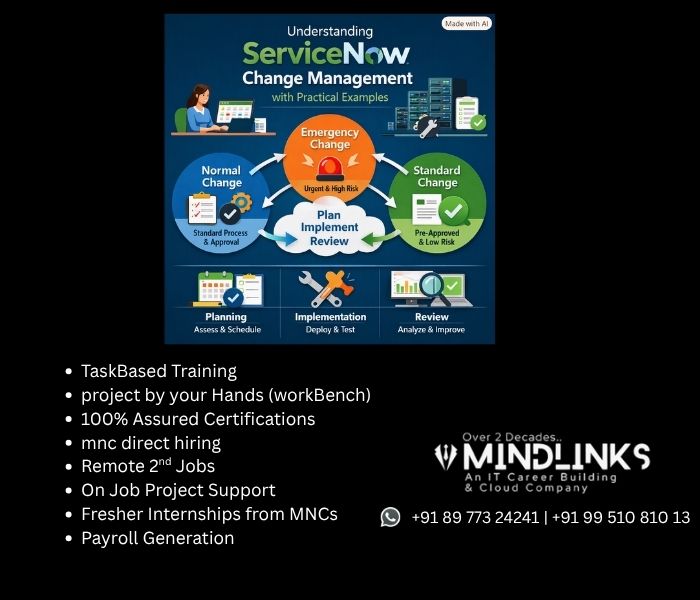
Understanding ServiceNow Change Management with Practical Examples
In modern IT organizations, changes are unavoidable. Companies regularly upgrade applications, patch servers, modify network configurations, migrate databases, introduce new cloud services, and implement security improvements. However, making changes without proper planning can result in service interruptions, security vulnerabilities, data loss, and unexpected business problems.
This is why ServiceNow Change Management is an important part of modern IT Service Management (ITSM). It provides organizations with a structured process to plan, assess, approve, schedule, implement, and review IT changes.
For professionals who want to build a career in ITSM or become a ServiceNow administrator, developer, consultant, or implementation specialist, understanding Change Management is especially valuable. Practical training from institutes such as Mindlinks Institute can help learners understand these concepts through real-world scenarios and hands-on practice.
In this article, we will explore ServiceNow Change Management, its types, lifecycle, practical examples, benefits, and how learning through Mindlinks Institute can help aspiring ServiceNow professionals.
What Is ServiceNow Change Management?
ServiceNow Change Management is an ITSM process designed to control changes within an organization’s IT environment.
A change refers to an addition, modification, or removal that could affect an IT service or infrastructure component.
Common examples include:
- Installing a new software version
- Applying security patches to servers
- Upgrading a database
- Changing firewall rules
- Migrating applications to the cloud
- Modifying network configurations
- Replacing hardware
- Deploying new application functionality
The purpose of ServiceNow Change Management is not to stop organizations from making changes. Instead, it ensures that changes are planned, assessed, approved, implemented, and documented properly.
For example, suppose an organization wants to upgrade its production database. If an administrator performs the upgrade without informing other teams, the application could become unavailable.
Using ServiceNow, the team can create a change request, identify the affected configuration items, evaluate the risk, obtain the required approvals, schedule the maintenance window, implement the change, and document the outcome.
Why Is ServiceNow Change Management Important?
A poorly managed change can cause significant business impact.
Imagine an online banking application going offline because a network configuration was changed without proper testing. The organization could lose revenue, customer trust, and productivity.
An effective ServiceNow Change Management process helps organizations minimize these risks.
Some important benefits include:
- Reducing service disruptions
- Improving change visibility
- Managing IT risks
- Creating accountability
- Coordinating different IT teams
- Supporting compliance and audits
- Tracking change history
- Improving communication
- Measuring change success and failure rates
ServiceNow provides a centralized platform where organizations can manage these activities instead of relying on emails, spreadsheets, or disconnected systems.
Types of Changes in ServiceNow
Understanding the different types of changes in ServiceNow is essential for anyone learning ServiceNow ITSM.
The three commonly used categories are Standard Change, Normal Change, and Emergency Change.
1. Standard Change
A Standard Change is a low-risk, routine, and repeatable change that follows an established procedure.
These changes are usually well understood and have predictable outcomes.
Examples include:
- Installing an approved software package
- Replacing a standard hardware component
- Performing a routine configuration update
- Adding an approved user group
Practical Example of a Standard Change
Suppose an organization regularly installs an approved security application on employee computers.
The IT team has already tested the installation procedure and determined that it presents minimal risk.
Instead of treating every installation as a completely new change, the organization can use a predefined standard change process.
This saves time while maintaining appropriate control.
2. Normal Change
A Normal Change is a change that requires proper assessment, planning, approval, and scheduling.
Examples include:
- Production application upgrades
- Database migrations
- Network changes
- Server upgrades
- Infrastructure modifications
Practical Example of a Normal Change
Consider a company planning to upgrade its customer application from version 5.0 to version 6.0.
The application team creates a ServiceNow change request containing:
- Change description
- Business justification
- Risk and impact
- Implementation plan
- Testing plan
- Backout plan
- Planned start time
- Planned completion time
- Affected configuration items
The appropriate stakeholders review the change before it is implemented.
This structured approach significantly reduces the possibility of an unexpected production outage.
3. Emergency Change
An Emergency Change is used when an urgent change is required to address a critical issue.
Examples include:
- Fixing a major production outage
- Applying an urgent security patch
- Blocking a security threat
- Restoring a critical business service
Practical Example of an Emergency Change
Suppose a critical security vulnerability is discovered in a production server and there is an immediate threat of exploitation.
Waiting for the organization’s normal change cycle may create unacceptable risk.
An emergency change process allows the organization to respond quickly while still maintaining appropriate documentation and authorization according to its policies.
ServiceNow Change Management Lifecycle
Understanding the ServiceNow Change Management lifecycle is one of the most important areas for ServiceNow ITSM professionals.
A typical lifecycle includes the following stages.
1. Create the Change
The requester creates a change record and provides information about the planned activity.
Important information may include:
- Short description
- Description
- Change type
- Configuration item
- Assignment group
- Risk
- Impact
- Planned dates
- Implementation details
2. Assess the Change
The change is evaluated based on risk, impact, complexity, and dependencies.
The team may ask:
- Which applications will be affected?
- Will customers experience downtime?
- Is the change being performed in production?
- Are other systems dependent on the affected component?
- Has the change been tested?
- Is a rollback plan available?
3. Approval
Depending on organizational policies, the change may require approval from managers, technical owners, business owners, or a Change Advisory Board (CAB).
High-risk changes generally require greater scrutiny than low-risk changes.
4. Schedule the Change
After approval, the change is scheduled for an appropriate maintenance window.
Scheduling helps prevent conflicts between different IT teams.
For example, the database team should not perform maintenance at the same time that the application team is deploying a major release that depends on that database.
5. Implement the Change
The assigned team performs the implementation according to the approved plan.
For example:
- Take a backup.
- Enable maintenance mode.
- Install the required update.
- Restart services.
- Perform technical validation.
- Conduct application testing.
- Monitor the environment.
6. Validate the Change
After implementation, the team confirms whether the change achieved its intended result.
Validation may include:
- Application testing
- Database connectivity testing
- Server health checks
- Network testing
- Performance monitoring
- User acceptance testing
7. Close the Change
Once the implementation and validation are complete, the change is closed.
The record should contain the final implementation result, any issues encountered, and relevant follow-up information.
Practical ServiceNow Change Management Example
Let’s take a real-world example of an e-commerce company.
The company wants to deploy a new version of its online shopping application.
The development team has tested the application in development and staging environments.
Before deploying it to production, the team creates a ServiceNow change request.
Change Details
Change: Deploy E-commerce Application Version 4.5
Reason: Introduce new payment functionality and security improvements.
Impact: Customers may experience approximately 10 minutes of planned downtime.
Risk: Medium.
Implementation Plan
- Take a backup of the production environment.
- Enable maintenance mode.
- Deploy application version 4.5.
- Update the required database components.
- Restart application services.
- Perform payment transaction testing.
- Verify customer login functionality.
- Disable maintenance mode.
- Monitor application performance.
Backout Plan
If the deployment fails, the team will restore the previous application version and database configuration.
The change is reviewed, approved, and scheduled during a low-traffic period.
After implementation, the team performs validation and confirms that customers can successfully log in and make purchases.
The change is then documented as successful.
This example demonstrates how ServiceNow Change Management practical scenarios can be applied to real IT environments.
Configuration Items and ServiceNow Change Management
A Configuration Item (CI) is another important concept in ServiceNow.
A CI can represent:
- Server
- Database
- Application
- Network device
- Cloud resource
- Business service
Associating a change with the appropriate CI helps organizations understand what is being modified and which services may be affected.
For example, if a production database is being upgraded, the database CI can be associated with the change. The organization can then better understand the relationship between the database and the business services depending on it.
Understanding ServiceNow CMDB and Configuration Items is therefore valuable for professionals working with Change Management.
Role of the Change Advisory Board
The Change Advisory Board (CAB) helps organizations review significant changes.
CAB participants may include:
- Change managers
- IT operations managers
- Application owners
- Infrastructure teams
- Security teams
- Network specialists
- Business representatives
The CAB may evaluate whether:
- The change is necessary
- The risk is acceptable
- Testing has been completed
- The implementation plan is sufficient
- The backout plan is realistic
- The timing is appropriate
The CAB process helps organizations make informed decisions about high-impact changes.
Important ServiceNow Change Management Metrics
Organizations can use metrics to evaluate the effectiveness of their change management process.
Common ServiceNow Change Management metrics include:
- Change success rate
- Change failure rate
- Emergency change percentage
- Number of unauthorized changes
- Changes completed on schedule
- Number of incidents caused by changes
- Change-related downtime
For example, if an organization discovers that a large percentage of failed changes are related to insufficient testing, it can improve its testing and approval processes.
How Mindlinks Institute Helps You Learn ServiceNow Change Management
Learning ServiceNow concepts from documentation alone can be challenging, especially for beginners. Understanding the theory is important, but practical exposure is equally valuable.
Mindlinks Institute can be helpful for learners who want to develop practical knowledge of ServiceNow and ITSM concepts.
A structured ServiceNow training program can help students understand topics such as:
- ServiceNow fundamentals
- ITSM concepts
- Incident Management
- Problem Management
- Change Management
- Service Catalog
- CMDB
- Configuration Items
- ServiceNow administration
- Workflows and automation
- Real-time ITSM scenarios
One of the major advantages of practical learning is that students can understand how theoretical concepts are used in real projects.
For example, instead of only learning the definition of a Normal Change, a learner can practice creating a change request, selecting the appropriate configuration item, entering implementation and rollback plans, configuring approvals, and understanding the change lifecycle.
This type of hands-on experience can make it easier to understand how ServiceNow is used in enterprise IT environments.
Practical Learning for Career Development
For people preparing for a ServiceNow career, practical knowledge can be particularly useful.
A learner may understand the definition of Change Management but still struggle to explain how a production change moves from creation to closure during an interview.
Hands-on training can help learners become comfortable discussing practical scenarios such as:
- How do you create a change request?
- What is the difference between Standard, Normal, and Emergency changes?
- What is a CAB?
- How does change approval work?
- What is a backout plan?
- How are configuration items associated with changes?
- How can change conflicts be identified?
- What happens after a change is implemented?
- How do you measure change success?
This combination of ServiceNow training, ITSM knowledge, and practical examples can help learners prepare for ServiceNow-related job roles and certification paths.
ServiceNow Training and Certification
For professionals planning a career in the ServiceNow ecosystem, learning the platform systematically can provide a strong foundation.
Depending on career goals, learners may explore roles such as:
- ServiceNow Administrator
- ServiceNow Developer
- ServiceNow Consultant
- ITSM Consultant
- ServiceNow Business Analyst
- ServiceNow Implementation Specialist
A training program can help learners build foundational knowledge before pursuing relevant ServiceNow certification or role-based learning paths.
However, certification alone is not enough. Employers may also value practical understanding, troubleshooting ability, communication skills, and experience working with real-world ITSM scenarios.
Best Practices for ServiceNow Change Management
Organizations can improve their change management process by following several best practices:
Document every significant change: Maintain accurate records of what is being changed and why.
Perform risk assessment: Understand the potential business and technical impact before implementation.
Maintain a rollback plan: Always determine what action will be taken if the change fails.
Test before production: Whenever possible, validate changes in lower environments before production implementation.
Schedule carefully: Avoid implementing high-risk changes during critical business periods.
Use automation: Automate repetitive approvals and standard change processes where appropriate.
Review failed changes: Analyze failed changes to identify improvement opportunities.
Monitor change-related incidents: Determine whether changes are contributing to production incidents.
Conclusion
ServiceNow Change Management is a critical component of IT Service Management that helps organizations introduce IT changes in a controlled and predictable way.
By understanding Standard, Normal, and Emergency Changes, professionals can better understand how organizations manage different levels of risk. Learning the complete ServiceNow Change Management lifecycle—from creating and assessing a change to approval, scheduling, implementation, validation, and closure—is essential for anyone working with ServiceNow ITSM.
Practical examples such as application deployments, server patching, database upgrades, and network changes demonstrate how Change Management works in real business environments.
For aspiring ServiceNow professionals, structured training can make these concepts easier to understand and apply. Mindlinks Institute can help learners build practical knowledge of ServiceNow and ITSM through structured learning and real-world-oriented scenarios.
Ultimately, the goal of ServiceNow Change Management is simple: make the right change, at the right time, with the right level of planning and control. With strong theoretical knowledge, hands-on practice, and an understanding of real-world ITSM processes, learners can build a stronger foundation for a successful career in the ServiceNow ecosystem.